Reading a long PDF can take hours, which is why AI PDF summarizers have become useful for students, researchers, freelancers, and business professionals. They can turn lengthy documents into shorter summaries, highlight important findings, and help readers understand the main ideas more quickly.
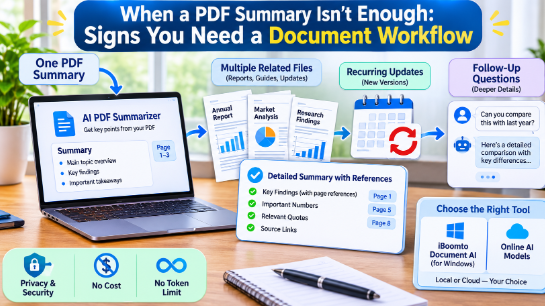
However, there comes a point when a single summary is no longer enough. If you regularly work with multiple related documents, receive updated reports, or need to ask detailed questions about information inside a file, you may need something more comprehensive: a document workflow.
Understanding when to move beyond basic summarization can help you save time and organize your research more effectively.
Start with a First-Pass PDF Summary
Not every document requires a complicated workflow. Sometimes, you simply need to understand the main argument of a research paper, identify important sections in a business report, or review the key points of a lengthy guide.
An AI PDF Summarizer free tool can help with this first step. For example, iBoomto AI PDF Summarizer allows users to upload a PDF and receive a structured summary containing important points, findings, and source-page references.
Instead of manually reading every page, you can review the main information first and decide which sections deserve closer attention.
This approach works particularly well when you have one document, a straightforward question, and no immediate need to compare information across different sources.
But certain situations require more than a quick overview.
1. You Regularly Work with Multiple Related Files
One summary may be enough for a single research paper, but what happens when you have five reports discussing the same subject?
Reading each document separately makes it difficult to identify similarities, differences, and conflicting information. You might also forget which report contains a particular statistic or recommendation.
This is a clear sign that you need a broader document workflow.
For example, imagine a marketing professional reviewing three quarterly performance reports. Each PDF contains information about sales, customer behavior, advertising expenses, and campaign results.
Rather than treating each summary as an isolated result, the professional needs to compare the documents and identify changes across reporting periods.
A useful workflow should help you:
- Review multiple related documents.
- Compare important findings between reports.
- Identify differences in numerical information.
- Locate specific information within individual files.
- Keep track of which document supports each conclusion.
Working with several documents together makes research more organized and reduces unnecessary switching between files.
2. Your Documents Receive Recurring Updates
Another sign that a basic summary is no longer sufficient is regularly receiving updated versions of the same documents.
Businesses frequently publish monthly reports, quarterly financial statements, revised policies, and updated project documentation.
Reading every new version from the beginning can become repetitive.
Consider a business analyst who receives a new performance report every month. The analyst needs to understand what has changed, which figures remain consistent, and whether any new recommendations have appeared.
A useful approach is to summarize each new version, compare its important findings with the previous report, and verify changes against the original pages.
This is especially helpful when working with documents that follow a consistent structure.
However, summaries alone should not be treated as an automatic version-control system. Keep the original files organized and clearly label their dates or versions so that comparisons remain accurate.
3. You Need More Than One Follow-Up Question
A summary usually answers the broad question: What is this document about?
Professional research often requires much more specific information.
For example, after reviewing a business report, you might want to know:
- Which factors contributed most to the reported growth?
- What limitations did the research identify?
- Which recommendations appeared in the conclusion?
- How did the findings differ from the previous report?
- Where does the document discuss a particular statistic?
Repeatedly searching through a lengthy PDF to answer these questions can interrupt your workflow.
A document assistant that supports natural-language follow-up questions can make this process easier. You can ask additional questions about the document, locate relevant sections, and examine the information without starting the research process again.
Source references are particularly useful because they allow you to return to the original page and verify the information before using it.
4. You Need to Organize Different Document Tasks
Document work rarely involves summarization alone. Depending on your project, you might need to extract information, proofread content, edit files, create notes, or prepare a new report.
Using separate applications for every task can create unnecessary complexity.
A broader document workflow brings related activities into one working environment. Instead of repeatedly moving information between different tools, you can handle several document-related tasks through a single application.
For example, a researcher might:
- Read a collection of PDF research papers.
- Extract important findings from each document.
- Ask questions about specific sections.
- Organize the findings into structured notes.
- Prepare a report based on verified information.
The important distinction is that a workflow connects several tasks into a repeatable process rather than producing just one summary.
5. Consider a Windows Document Assistant for Ongoing Work
When document processing becomes part of your routine, a desktop application may offer more flexibility than relying exclusively on individual online tools.
iBoomto AI Document Assistant is a Windows-based document assistant designed to help users read, summarize, extract, proofread, edit, and create documents.
It supports common document formats, including PDF, Word, Excel, PowerPoint, and text files. Users can work with ready-to-use functions or provide instructions for document-related tasks.
One important feature is its support for both online and local AI models. Online models provide cloud-based processing options, while local models can run directly on a compatible Windows computer.
Local processing can be particularly useful when privacy and security are important. With supported local workflows, documents remain on the device rather than being uploaded to external servers for remote storage. AI-assisted online processing follows a different data-handling process, so users should select the appropriate mode for their documents.
iBoomto also provides free access to local AI document assistance without token-based charges or monthly token limits. Local processing is subject to hardware capabilities and model context limits, however, so unlimited token charges do not mean unlimited document length in a single request.
Conclusion
An AI PDF summary is a useful starting point, but it cannot replace every part of a document workflow. When you begin working with multiple related files, recurring report updates, and repeated follow-up questions, a more comprehensive approach becomes valuable.
Start with a simple summarizer when you only need an overview. Move toward a document assistant when your work involves comparing sources, extracting information, asking detailed questions, and handling several document tasks.
Choosing the right approach helps you spend less time managing files and more time understanding the information they contain.
